
先看一下基本效果:

可实现usb摄像头实时的进行检测,对于中等的yolov10s模型,FPS在8左右。跑的是tensorrt fp16模型。
可视化界面如图:
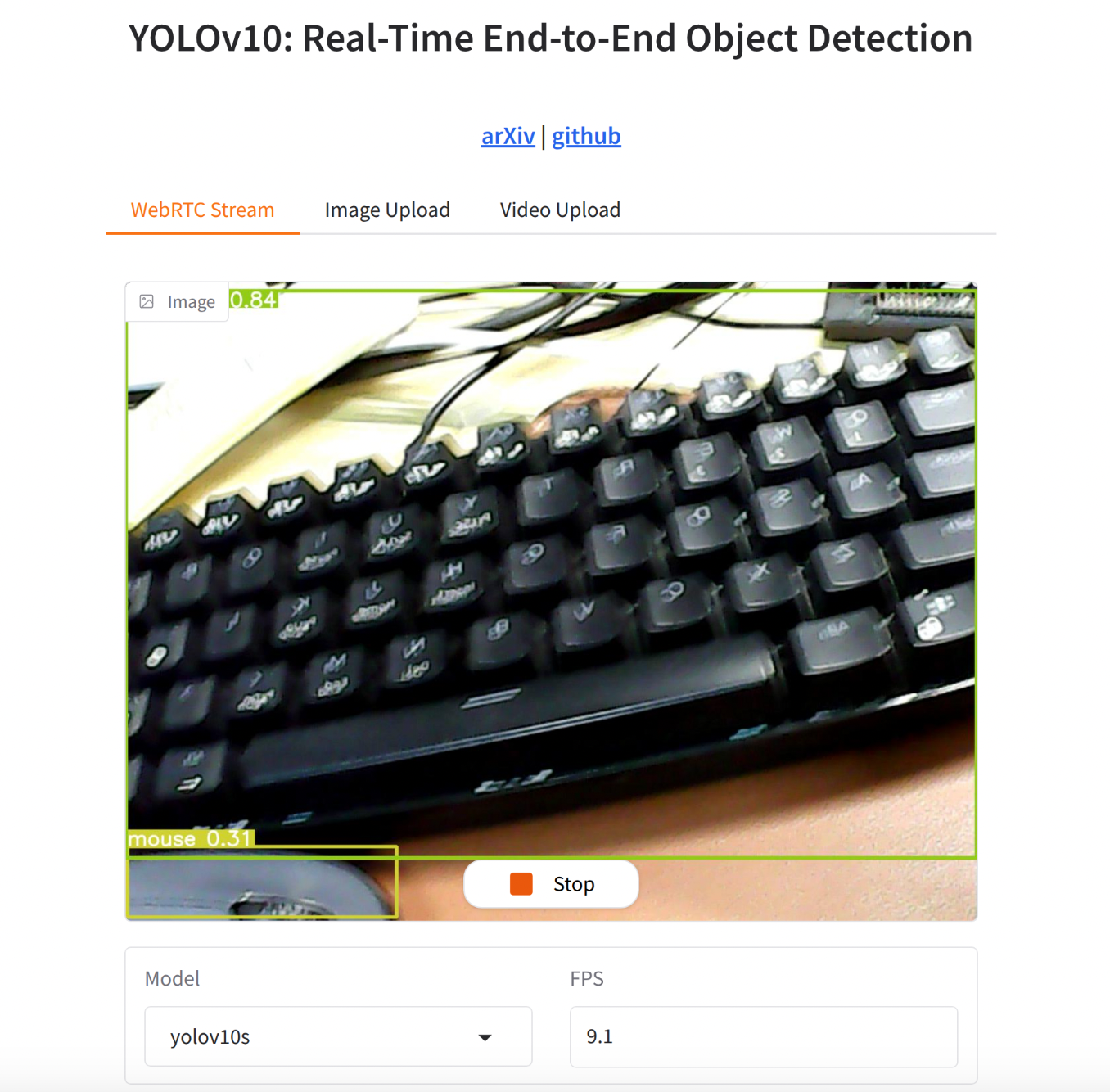
如果觉着下面的配置过程繁琐,也可以直接跳到第四部分,有开箱即用的方法。
一、环境配置和usb摄像头配置
- 参考之前发布的“jetson orin nano super AI模型部署之路(二)保姆级最好用AI环境配置”和“jetson orin nano super AI模型部署之路(六)docker内使用usb摄像头”两篇完成开发环境的配置。
二、yolov10代码修改以使用tensorrt
我们使用的基础代码是清华随着yolov10 paper发布的官方代码:(THU-MIG/yolov10)[https://github.com/THU-MIG/yolov10/tree/main],这个代码基于yolov8改的,很多地方比较老了。我们在步骤一中配置的环境是较新的tensorrt 10,因此要对代码进行一定适配。
首先编写导出tensorrt模型的代码:这里直接导出fp16的模型,精度和fp32差不多,但是性能可以提升1倍。
from ultralytics import YOLOv10
import os
for model_name in [
“yolov10n”,
“yolov10s”,
“yolov10m”,
“yolov10b”,
“yolov10l”,
“yolov10x”,
]:
if not os.path.exists(f"{model_name}.pt"):
print(f"{model_name}.pt not found, skipping export.")
continue
if os.path.exists(f"{model_name}.engine"):
print(f"{model_name}.engine already exists, skipping export.")
continue
model = YOLOv10(f"{model_name}.pt") # Load a pretrained YOLOv10 model
model.export(format=“engine”, half=True) # creates ‘yolo11n.engine’
然后需要修改ultralytics源码内部对于tensorrt导出的代码,以让其支持tensorrt 10.
代码路径是ultralytics/engine/exporteer.py,搜索def export_engine。
export_engine的原始实现是:
@try_export
def export_engine(self, prefix=colorstr(“TensorRT:”)):
“”“YOLOv8 TensorRT export https://developer.nvidia.com/tensorrt.”""
assert self.im.device.type != “cpu”, “export running on CPU but must be on GPU, i.e. use ‘device=0’”
f_onnx, _ = self.export_onnx() # run before TRT import https://github.com/ultralytics/ultralytics/issues/7016
    try:
        import tensorrt as trt  # noqa
    except ImportError:
        if LINUX:
            check_requirements("nvidia-tensorrt", cmds="-U --index-url https://pypi.ngc.nvidia.com")
        import tensorrt as trt  # noqa

    check_version(trt.__version__, "7.0.0", hard=True)  # require tensorrt>=7.0.0

    self.args.simplify = True

    LOGGER.info(f"\n{prefix} starting export with TensorRT {trt.__version__}...")
    assert Path(f_onnx).exists(), f"failed to export ONNX file: {f_onnx}"
    f = self.file.with_suffix(".engine")  # TensorRT engine file
    logger = trt.Logger(trt.Logger.INFO)
    if self.args.verbose:
        logger.min_severity = trt.Logger.Severity.VERBOSE

    builder = trt.Builder(logger)
    config = builder.create_builder_config()
    config.max_workspace_size = self.args.workspace * 1 << 30
    # config.set_memory_pool_limit(trt.MemoryPoolType.WORKSPACE, workspace << 30)  # fix TRT 8.4 deprecation notice

    flag = 1 << int(trt.NetworkDefinitionCreationFlag.EXPLICIT_BATCH)
    network = builder.create_network(flag)
    parser = trt.OnnxParser(network, logger)
    if not parser.parse_from_file(f_onnx):
        raise RuntimeError(f"failed to load ONNX file: {f_onnx}")

    inputs = [network.get_input(i) for i in range(network.num_inputs)]
    outputs = [network.get_output(i) for i in range(network.num_outputs)]
    for inp in inputs:
        LOGGER.info(f'{prefix} input "{inp.name}" with shape{inp.shape} {inp.dtype}')
    for out in outputs:
        LOGGER.info(f'{prefix} output "{out.name}" with shape{out.shape} {out.dtype}')

    if self.args.dynamic:
        shape = self.im.shape
        if shape[0] <= 1:
            LOGGER.warning(f"{prefix} WARNING ⚠️ 'dynamic=True' model requires max batch size, i.e. 'batch=16'")
        profile = builder.create_optimization_profile()
        for inp in inputs:
            profile.set_shape(inp.name, (1, *shape[1:]), (max(1, shape[0] // 2), *shape[1:]), shape)
        config.add_optimization_profile(profile)

    LOGGER.info(
        f"{prefix} building FP{16 if builder.platform_has_fast_fp16 and self.args.half else 32} engine as {f}"
    )
    if builder.platform_has_fast_fp16 and self.args.half:
        config.set_flag(trt.BuilderFlag.FP16)

    del self.model
    torch.cuda.empty_cache()

    # Write file
    with builder.build_engine(network, config) as engine, open(f, "wb") as t:
        # Metadata
        meta = json.dumps(self.metadata)
        t.write(len(meta).to_bytes(4, byteorder="little", signed=True))
        t.write(meta.encode())
        # Model
        t.write(engine.serialize())

    return f, None
这里面的大部分API都是兼容tensorrt 7的比较旧的,需要更新其为新的API,但是代码也要同时兼容老的API。新的代码修改为:
@try_export
def export_engine(self, dla=None, prefix=colorstr("TensorRT:")):
    """YOLO TensorRT export https://developer.nvidia.com/tensorrt."""
    assert self.im.device.type != "cpu", "export running on CPU but must be on GPU, i.e. use 'device=0'"
    f_onnx, _ = self.export_onnx()  # run before TRT import https://github.com/ultralytics/ultralytics/issues/7016

    try:
        import tensorrt as trt  # noqa
    except ImportError:
        if LINUX:
            check_requirements("tensorrt>7.0.0,!=10.1.0")
        import tensorrt as trt  # noqa
    check_version(trt.__version__, ">=7.0.0", hard=True)
    check_version(trt.__version__, "!=10.1.0", msg="https://github.com/ultralytics/ultralytics/pull/14239")

    # Setup and checks
    LOGGER.info(f"\n{prefix} starting export with TensorRT {trt.__version__}...")
    is_trt10 = int(trt.__version__.split(".")[0]) >= 10  # is TensorRT >= 10
    assert Path(f_onnx).exists(), f"failed to export ONNX file: {f_onnx}"
    f = self.file.with_suffix(".engine")  # TensorRT engine file
    logger = trt.Logger(trt.Logger.INFO)
    if self.args.verbose:
        logger.min_severity = trt.Logger.Severity.VERBOSE

    # Engine builder
    builder = trt.Builder(logger)
    config = builder.create_builder_config()
    workspace = int((self.args.workspace or 0) * (1 << 30))
    if is_trt10 and workspace > 0:
        config.set_memory_pool_limit(trt.MemoryPoolType.WORKSPACE, workspace)
    elif workspace > 0:  # TensorRT versions 7, 8
        config.max_workspace_size = workspace
    flag = 1 << int(trt.NetworkDefinitionCreationFlag.EXPLICIT_BATCH)
    network = builder.create_network(flag)
    half = builder.platform_has_fast_fp16 and self.args.half
    int8 = builder.platform_has_fast_int8 and self.args.int8

    # Optionally switch to DLA if enabled
    if dla is not None:
        # if not IS_JETSON:
        #     raise ValueError("DLA is only available on NVIDIA Jetson devices")
        LOGGER.info(f"{prefix} enabling DLA on core {dla}...")
        if not self.args.half and not self.args.int8:
            raise ValueError(
                "DLA requires either 'half=True' (FP16) or 'int8=True' (INT8) to be enabled. Please enable one of them and try again."
            )
        config.default_device_type = trt.DeviceType.DLA
        config.DLA_core = int(dla)
        config.set_flag(trt.BuilderFlag.GPU_FALLBACK)

    # Read ONNX file
    parser = trt.OnnxParser(network, logger)
    if not parser.parse_from_file(f_onnx):
        raise RuntimeError(f"failed to load ONNX file: {f_onnx}")

    # Network inputs
    inputs = [network.get_input(i) for i in range(network.num_inputs)]
    outputs = [network.get_output(i) for i in range(network.num_outputs)]
    for inp in inputs:
        LOGGER.info(f'{prefix} input "{inp.name}" with shape{inp.shape} {inp.dtype}')
    for out in outputs:
        LOGGER.info(f'{prefix} output "{out.name}" with shape{out.shape} {out.dtype}')

    if self.args.dynamic:
        shape = self.im.shape
        if shape[0] <= 1:
            LOGGER.warning(f"{prefix} WARNING ⚠️ 'dynamic=True' model requires max batch size, i.e. 'batch=16'")
        profile = builder.create_optimization_profile()
        min_shape = (1, shape[1], 32, 32)  # minimum input shape
        max_shape = (*shape[:2], *(int(max(1, self.args.workspace or 1) * d) for d in shape[2:]))  # max input shape
        for inp in inputs:
            profile.set_shape(inp.name, min=min_shape, opt=shape, max=max_shape)
        config.add_optimization_profile(profile)

    LOGGER.info(f"{prefix} building {'INT8' if int8 else 'FP' + ('16' if half else '32')} engine as {f}")
    if int8:
        config.set_flag(trt.BuilderFlag.INT8)
        config.set_calibration_profile(profile)
        config.profiling_verbosity = trt.ProfilingVerbosity.DETAILED

        class EngineCalibrator(trt.IInt8Calibrator):
            def __init__(
                self,
                dataset,  # ultralytics.data.build.InfiniteDataLoader
                batch: int,
                cache: str = "",
            ) -> None:
                trt.IInt8Calibrator.__init__(self)
                self.dataset = dataset
                self.data_iter = iter(dataset)
                self.algo = trt.CalibrationAlgoType.ENTROPY_CALIBRATION_2
                self.batch = batch
                self.cache = Path(cache)

            def get_algorithm(self) -> trt.CalibrationAlgoType:
                """Get the calibration algorithm to use."""
                return self.algo

            def get_batch_size(self) -> int:
                """Get the batch size to use for calibration."""
                return self.batch or 1

            def get_batch(self, names) -> list:
                """Get the next batch to use for calibration, as a list of device memory pointers."""
                try:
                    im0s = next(self.data_iter)["img"] / 255.0
                    im0s = im0s.to("cuda") if im0s.device.type == "cpu" else im0s
                    return [int(im0s.data_ptr())]
                except StopIteration:
                    # Return [] or None, signal to TensorRT there is no calibration data remaining
                    return None

            def read_calibration_cache(self) -> bytes:
                """Use existing cache instead of calibrating again, otherwise, implicitly return None."""
                if self.cache.exists() and self.cache.suffix == ".cache":
                    return self.cache.read_bytes()

            def write_calibration_cache(self, cache) -> None:
                """Write calibration cache to disk."""
                _ = self.cache.write_bytes(cache)

        # Load dataset w/ builder (for batching) and calibrate
        config.int8_calibrator = EngineCalibrator(
            dataset=self.get_int8_calibration_dataloader(prefix),
            batch=2 * self.args.batch,  # TensorRT INT8 calibration should use 2x batch size
            cache=str(self.file.with_suffix(".cache")),
        )

    elif half:
        config.set_flag(trt.BuilderFlag.FP16)

    # Free CUDA memory
    del self.model
    gc.collect()
    torch.cuda.empty_cache()

    # Write file
    build = builder.build_serialized_network if is_trt10 else builder.build_engine
    with build(network, config) as engine, open(f, "wb") as t:
        # Metadata
        meta = json.dumps(self.metadata)
        t.write(len(meta).to_bytes(4, byteorder="little", signed=True))
        t.write(meta.encode())
        # Model
        t.write(engine if is_trt10 else engine.serialize())

    return f, None
这里主要的修改为:
(1)根据不同的tensorrt版本来自动确定分配内存池的API
   if is_trt10 and workspace > 0:
        config.set_memory_pool_limit(trt.MemoryPoolType.WORKSPACE, workspace)
    elif workspace > 0:  # TensorRT versions 7, 8
        config.max_workspace_size = workspace
(2)在支持DLA的板子上使用DLA来部署模型
    # Optionally switch to DLA if enabled
    if dla is not None:
        # if not IS_JETSON:
        #     raise ValueError("DLA is only available on NVIDIA Jetson devices")
        LOGGER.info(f"{prefix} enabling DLA on core {dla}...")
        if not self.args.half and not self.args.int8:
            raise ValueError(
                "DLA requires either 'half=True' (FP16) or 'int8=True' (INT8) to be enabled. Please enable one of them and try again."
            )
        config.default_device_type = trt.DeviceType.DLA
        config.DLA_core = int(dla)
        config.set_flag(trt.BuilderFlag.GPU_FALLBACK)
(3)根据不同的tensorrt版本,来确定build tensorrt engine的API
build = builder.build_serialized_network if is_trt10 else builder.build_engine
with build(network, config) as engine, open(f, “wb”) as t:
# Metadata
meta = json.dumps(self.metadata)
t.write(len(meta).to_bytes(4, byteorder=“little”, signed=True))
t.write(meta.encode())
# Model
t.write(engine if is_trt10 else engine.serialize())
导出tensorrt engine后,然后运行tensorrt的model的时候,同样需要对其推理的代码进行修改以适配tensorrt 10.
ultralytics推理时,会运行到ultralytics/nn/autobacked.py中。针对tensorrt backend,具体的代码是elif engine分支。原始的实现是:
  TensorRT
    elif engine:
        LOGGER.info(f"Loading {w} for TensorRT inference...")
        try:
            import tensorrt as trt  # noqa https://developer.nvidia.com/nvidia-tensorrt-download
        except ImportError:
            if LINUX:
                check_requirements("nvidia-tensorrt", cmds="-U --index-url https://pypi.ngc.nvidia.com")
            import tensorrt as trt  # noqa
        check_version(trt.__version__, "7.0.0", hard=True)  # require tensorrt>=7.0.0
        if device.type == "cpu":
            device = torch.device("cuda:0")
        Binding = namedtuple("Binding", ("name", "dtype", "shape", "data", "ptr"))
        logger = trt.Logger(trt.Logger.INFO)
        # Read file
        with open(w, "rb") as f, trt.Runtime(logger) as runtime:
            meta_len = int.from_bytes(f.read(4), byteorder="little")  # read metadata length
            metadata = json.loads(f.read(meta_len).decode("utf-8"))  # read metadata
            model = runtime.deserialize_cuda_engine(f.read())  # read engine
        context = model.create_execution_context()
        bindings = OrderedDict()
        output_names = []
        fp16 = False  # default updated below
        dynamic = False
        for i in range(model.num_bindings):
            name = model.get_binding_name(i)
            dtype = trt.nptype(model.get_binding_dtype(i))
            if model.binding_is_input(i):
                if -1 in tuple(model.get_binding_shape(i)):  # dynamic
                    dynamic = True
                    context.set_binding_shape(i, tuple(model.get_profile_shape(0, i)[2]))
                if dtype == np.float16:
                    fp16 = True
            else:  # output
                output_names.append(name)
            shape = tuple(context.get_binding_shape(i))
            im = torch.from_numpy(np.empty(shape, dtype=dtype)).to(device)
            bindings[name] = Binding(name, dtype, shape, im, int(im.data_ptr()))
        binding_addrs = OrderedDict((n, d.ptr) for n, d in bindings.items())
        batch_size = bindings["images"].shape[0]  # if dynamic, this is instead max batch size
我们对其修改,添加tensorrt 10的支持。修改后的代码为:
    # TensorRT
    elif engine:
        LOGGER.info(f"Loading {w} for TensorRT inference...")

        # if IS_JETSON and check_version(PYTHON_VERSION, "<=3.8.0"):
        #     # fix error: `np.bool` was a deprecated alias for the builtin `bool` for JetPack 4 with Python <= 3.8.0
        #     check_requirements("numpy==1.23.5")

        try:
            import tensorrt as trt  # noqa https://developer.nvidia.com/nvidia-tensorrt-download
        except ImportError:
            if LINUX:
                check_requirements("tensorrt>7.0.0,!=10.1.0")
            import tensorrt as trt  # noqa
        check_version(trt.__version__, ">=7.0.0", hard=True)
        check_version(trt.__version__, "!=10.1.0", msg="https://github.com/ultralytics/ultralytics/pull/14239")
        if device.type == "cpu":
            device = torch.device("cuda:0")
        Binding = namedtuple("Binding", ("name", "dtype", "shape", "data", "ptr"))
        logger = trt.Logger(trt.Logger.INFO)
        # Read file
        with open(w, "rb") as f, trt.Runtime(logger) as runtime:
            try:
                meta_len = int.from_bytes(f.read(4), byteorder="little")  # read metadata length
                metadata = json.loads(f.read(meta_len).decode("utf-8"))  # read metadata
            except UnicodeDecodeError:
                f.seek(0)  # engine file may lack embedded Ultralytics metadata
            dla = metadata.get("dla", None)
            if dla is not None:
                runtime.DLA_core = int(dla)
            model = runtime.deserialize_cuda_engine(f.read())  # read engine

        # Model context
        try:
            context = model.create_execution_context()
        except Exception as e:  # model is None
            LOGGER.error(f"ERROR: TensorRT model exported with a different version than {trt.__version__}\n")
            raise e

        bindings = OrderedDict()
        output_names = []
        fp16 = False  # default updated below
        dynamic = False
        is_trt10 = not hasattr(model, "num_bindings")
        num = range(model.num_io_tensors) if is_trt10 else range(model.num_bindings)
        for i in num:
            if is_trt10:
                name = model.get_tensor_name(i)
                dtype = trt.nptype(model.get_tensor_dtype(name))
                is_input = model.get_tensor_mode(name) == trt.TensorIOMode.INPUT
                if is_input:
                    if -1 in tuple(model.get_tensor_shape(name)):
                        dynamic = True
                        context.set_input_shape(name, tuple(model.get_tensor_profile_shape(name, 0)[1]))
                    if dtype == np.float16:
                        fp16 = True
                else:
                    output_names.append(name)
                shape = tuple(context.get_tensor_shape(name))
            else:  # TensorRT < 10.0
                name = model.get_binding_name(i)
                dtype = trt.nptype(model.get_binding_dtype(i))
                is_input = model.binding_is_input(i)
                if model.binding_is_input(i):
                    if -1 in tuple(model.get_binding_shape(i)):  # dynamic
                        dynamic = True
                        context.set_binding_shape(i, tuple(model.get_profile_shape(0, i)[1]))
                    if dtype == np.float16:
                        fp16 = True
                else:
                    output_names.append(name)
                shape = tuple(context.get_binding_shape(i))
            im = torch.from_numpy(np.empty(shape, dtype=dtype)).to(device)
            bindings[name] = Binding(name, dtype, shape, im, int(im.data_ptr()))
        binding_addrs = OrderedDict((n, d.ptr) for n, d in bindings.items())
        batch_size = bindings["images"].shape[0]  # if dynamic, this is instead max batch size
其中主要的修改是修改适配tensorrt 10的API:
is_trt10 = not hasattr(model, “num_bindings”)
num = range(model.num_io_tensors) if is_trt10 else range(model.num_bindings)
for i in num:
if is_trt10:
name = model.get_tensor_name(i)
dtype = trt.nptype(model.get_tensor_dtype(name))
is_input = model.get_tensor_mode(name) == trt.TensorIOMode.INPUT
if is_input:
if -1 in tuple(model.get_tensor_shape(name)):
dynamic = True
context.set_input_shape(name, tuple(model.get_tensor_profile_shape(name, 0)[1]))
if dtype == np.float16:
fp16 = True
else:
output_names.append(name)
shape = tuple(context.get_tensor_shape(name))
else: # TensorRT < 10.0
name = model.get_binding_name(i)
dtype = trt.nptype(model.get_binding_dtype(i))
is_input = model.binding_is_input(i)
if model.binding_is_input(i):
if -1 in tuple(model.get_binding_shape(i)): # dynamic
dynamic = True
context.set_binding_shape(i, tuple(model.get_profile_shape(0, i)[1]))
if dtype == np.float16:
fp16 = True
三、编写可视化界面
可视化界面使用gradio来搭建。
app的代码如下:
import gradio as gr
import cv2
import tempfile
from ultralytics import YOLOv10
import gradio as gr
import cv2
from gradio_webrtc import WebRTC
from fastrtc import WebRTC
from twilio.rest import Client
import os
import numpy as np
import time
import PIL.Image as Image
from collections import deque
from dotenv import load_dotenv
load_dotenv() # 添加在代码开头
account_sid = os.environ.get(“TWILIO_ACCOUNT_SID”)
auth_token = os.environ.get(“TWILIO_AUTH_TOKEN”)
if account_sid and auth_token:
print(‘USE twilio’)
client = Client(account_sid, auth_token)
token = client.tokens.create()

rtc_configuration = {
    "iceServers": token.ice_servers,
    "iceTransportPolicy": "relay",
}
else:
rtc_configuration = None
rtc_configuration = None
FPS 计算类
class FPS:
def init(self, avg_frames=30):
self.timestamps = deque(maxlen=avg_frames) # 用于存储时间戳
def update(self):
    self.timestamps.append(time.time())  # 添加当前时间戳

def get(self):
    if len(self.timestamps) < 2:
        return 0  # 如果时间戳不足,返回 0
    # return len(self.timestamps) / (self.timestamps[-1] - self.timestamps[0])  # 计算平均 FPS

    return round(len(self.timestamps) / (self.timestamps[-1] - self.timestamps[0]), 1)  # 计算平均 FPS,保留一位小数
fps_counter = FPS() # 创建 FPS 计数器实例
from ultralytics import YOLOv10
model = YOLOv10(“runs/V10train/exp3/weights/best.pt”)
model = YOLOv10("./yolov10s.engine")
print(f’{model = }’)
class ModelManager:
def init(self):
self.model_cache = {}
def get_model(self, model_id):
if model_id not in self.model_cache:
print(f"Loading model: {model_id}")
self.model_cache[model_id] = YOLOv10(f"./{model_id}.engine")
return self.model_cache[model_id]
model_manager = ModelManager() # 创建模型管理实例
def yolov10_inference_video(video_path):
fps_counter = FPS()
cap = cv2.VideoCapture(video_path)
while cap.isOpened():
    ret, frame = cap.read()
    if not ret:
        break

    # 更新 FPS 计数器
    fps_counter.update()

    # 模型推理
    results = model.predict(source=frame, imgsz=640, conf=0.05)
    r = results[0]
    im_bgr = r.plot()  # Ultralytics 默认输出 BGR numpy

    # 计算 FPS
    fps = fps_counter.get()
    cv2.putText(im_bgr, f"FPS: {fps:.1f}", (10, 30), cv2.FONT_HERSHEY_SIMPLEX, 1, (0, 255, 0), 2)

    # 将帧返回给 Gradio
    yield im_bgr  # 使用 yield 逐帧返回推理结果

cap.release()
last_model_id = ‘yolov10s’ # 用于存储上一个模型 ID
model = YOLOv10("./yolov10s.engine")
print(f’{model = }’)
def yolov10_inference(image,model_id):
global model
global last_model_id
if model_id != last_model_id:
last_model_id=model_id
model = YOLOv10(f"./{model_id}.engine")
print(f’\033[92mload model {model_id} success\033[0m’)
fps_counter.update()
if 1:
    results = model.predict(source=image, imgsz=640, conf=0.05, save=False)  # 整个文件夹测试

    for r in results:
        im_array = r.plot()
        im = Image.fromarray(im_array[..., ::-1])

    # 计算 FPS
    fps = fps_counter.get()
    print(f"FPS: {fps:.1f}")  # 在控制台打印 FPS

    return im,fps
def app():
with gr.Blocks():
with gr.Tabs(): # 添加选项卡
with gr.TabItem(“WebRTC Stream”): # WebRTC 输入选项卡
with gr.Row():
with gr.Column():
image = gr.Image(sources=[“webcam”], type=“pil”, streaming=True)
with gr.Row():
                model_id = gr.Dropdown(
                    label="Model",
                    choices=[
                        "yolov10n",
                        "yolov10s",
                        "yolov10m",
                    ],
                    value="yolov10s",
                )

                fps_display = gr.Textbox(label="FPS", interactive=False)  # 添加 FPS 显示框
            image.stream(
                fn=yolov10_inference, inputs=[image,model_id], outputs=[image,fps_display], stream_every=0.1
            )
                #     image = WebRTC(label="Stream", rtc_configuration=rtc_configuration, height=640, width=640)
                # image.stream(
                #     fn=yolov10_inference, inputs=[image], outputs=[image], time_limit=500
                # )


        with gr.TabItem("Image Upload"):  # 图片输入选项卡
            with gr.Row():
                with gr.Column():
                    input_image = gr.Image(label="Upload Image", type="pil")
                    output_image = gr.Image(label="Output Image", type="pil")
                input_image.change(
                    fn=yolov10_inference, inputs=[input_image], outputs=[output_image]
                )
        with gr.TabItem("Video Upload"):
            with gr.Row():
                with gr.Column():
                    video_input = gr.Video(label="Upload Video")
                    video_output = gr.Video(label="Output Video")
                video_input.change(
                    fn=lambda video_path: list(yolov10_inference_video(video_path)), inputs=[video_input],
                    outputs=[video_output]
                )
gradio_app = gr.Blocks()
with gradio_app:
gr.HTML(
“”"
YOLOv10: Real-Time End-to-End Object Detection
“”")
gr.HTML(
“”"
arXiv | github
“”")
with gr.Row():
with gr.Column():
app()
if name == ‘main’:
gradio_app.launch(server_name=‘0.0.0.0’)
这段代码是一个基于 Gradio 的 Web 应用程序,用于运行 YOLOv10 模型进行实时目标检测。以下是代码的主要功能和结构的简要解释:
依赖库和环境变量;
导入了 gradio、cv2、tempfile、os 等库,用于构建界面、处理图像/视频和管理文件。
使用 dotenv 加载环境变量,支持 Twilio 的 WebRTC 配置(如果需要)。
定义了 FPS 类,用于计算帧率。YOLOv10 模型加载与推理;
使用 ultralytics 库加载 YOLOv10 模型。
定义了 yolov10_inference 函数,用于对单张图像进行推理。
定义了 yolov10_inference_video 函数,用于逐帧处理视频并返回推理结果。Gradio 应用界面
使用 Gradio 的 Blocks 构建了一个多选项卡界面,分为以下功能:
WebRTC Stream: 实时视频流推理,支持从摄像头获取图像并显示推理结果。
Image Upload: 上传单张图片并进行推理。
Video Upload: 上传视频文件并逐帧处理,返回推理后的视频。模型切换
支持动态切换 YOLOv10 模型(如 yolov10n、yolov10s 等),通过 Dropdown 选择模型。
如果模型 ID 发生变化,会重新加载对应的模型。FPS 显示
在实时视频流推理中,使用 FPS 类计算帧率,并在推理结果中显示。Gradio 应用启动
使用 gr.Blocks 构建整个应用界面,并通过 gradio_app.launch(server_name=‘0.0.0.0’) 启动服务,允许局域网内访问。
代码结构总结
推理逻辑: 处理图像和视频的推理函数。
界面逻辑: 使用 Gradio 构建多选项卡界面,支持多种输入类型。
模型管理: 支持动态加载和切换 YOLOv10 模型。
实时功能: 支持实时视频流推理和帧率显示。
这段代码的目标是提供一个用户友好的界面,方便用户在不同输入类型(图像、视频、实时流)上运行 YOLOv10 模型进行目标检测。
四、开箱即用方法
代码我已经都编辑好了,直接clone即可:https://github.com/borninfreedom/yolov10_tensorrt_usb_cam
环境我已经配置好了docker,开箱即用:docker pull wenyan5986/yolov10_tensorrt_usb_cam
启用docker image的命令:
sudo docker run --runtime nvidia --gpus all --net host --ipc host -it
–device /dev/video0 --device /dev/video1 --name yolo_usb
-v /home:/home -e DISPLAY=$DISPLAY -v /tmp/.X11-unix:/tmp/.X11-unix
wenyan5986/yolov10_tensorrt_usb_cam:latest
以下是该 docker run 命令的解释:
sudo docker run:以超级用户权限运行一个 Docker 容器。
–runtime nvidia:指定使用 NVIDIA 容器运行时,以支持 GPU 加速。
–gpus all:将主机上的所有 GPU 分配给容器使用。
–net host:使用主机的网络模式,容器将共享主机的网络接口。
–ipc host:使用主机的进程间通信(IPC)命名空间,提升性能。
-it:以交互模式运行容器,并附加一个终端。
–device /dev/video0 --device /dev/video1:将主机的 /dev/video0 和 /dev/video1 设备(通常是 USB 摄像头)挂载到容器中,使容器可以访问这些设备。
–name yolo_usb:为容器指定名称为 yolo_usb,方便后续管理。
-v /home:/home:将主机的 /home 目录挂载到容器的 /home 目录中,允许容器访问主机的 /home 目录。
-e DISPLAY=$DISPLAY:将主机的 DISPLAY 环境变量传递给容器,支持图形界面显示。
-v /tmp/.X11-unix:/tmp/.X11-unix:将主机的 X11 Unix 套接字挂载到容器中,允许容器中的 GUI 应用程序与主机的 X 服务器通信。
wenyan5986/yolov10_tensorrt_usb_cam:latest:指定要运行的 Docker 镜像为 wenyan5986/yolov10_tensorrt_usb_cam,并使用其 latest 标签版本。
总结:
该命令用于启动一个基于 YOLOv10 的 Docker 容器,支持 GPU 加速、USB 摄像头输入以及图形界面显示,适合在主机上运行实时目标检测应用。
暂无评论

2026-01-27
2026-01-27
2026-01-27
2026-01-26
2025-12-18
回复评论